


How a resumable parallel backfill, two disk-pressure incidents and a second look at the reconciliation query got tens of billions of rows across, with logical replication running the whole time.
Key Takeaways
- A parallel backfill has to be stoppable. ID-range segments with per-batch checkpoints let workers be restarted, added or removed mid-run without copying a row twice or skipping one. An even split by ID is not an even split by rows.
- Bulk loading into a node whose WAL archiving is failing fills the disk with WAL. The safe recovery is to mark as archived only the WAL files proven to be in the backup repository, never to delete WAL by hand.
- One very large source transaction can stall a subscription and pin WAL on the source. Switching the subscription to
streaming = paralleldrained the backlog without restarting anything. - The reconciliation pass from Part 1 had two flaws that only show at scale: it missed updates that changed only the
Informationcolumn, and the planner chose a join that would read hundreds of times more rows than needed. Both are fixed, and the corrected query is below.
This is Part 2 of a migration series.
Part 1 covers how the live migration was monitored and the trigger that closed a silent data-loss race during the backfill.
Where We Are
All three large tables are now fully backfilled on the target, and the migration is days from cutover. When Part 1 was written the parent table was still being copied; since then parent_table, child_table and child_table_2 have all landed, together holding tens of billions of rows.
The plan held. The execution taught us things the plan could not. This part covers what broke at that scale, how each problem was handled without restarting the production cluster, and what we would do differently next time.
A Backfill You Can Stop
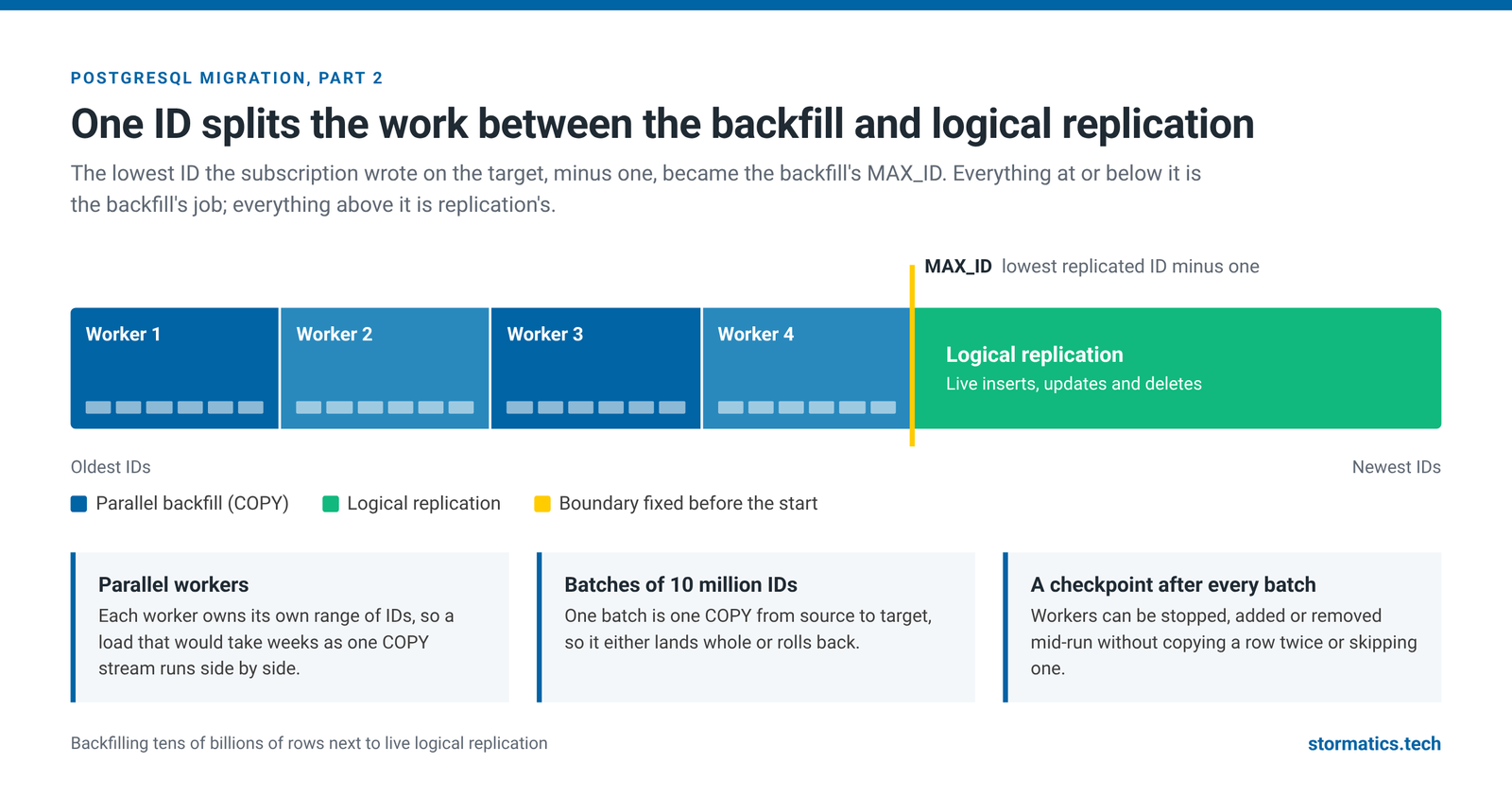
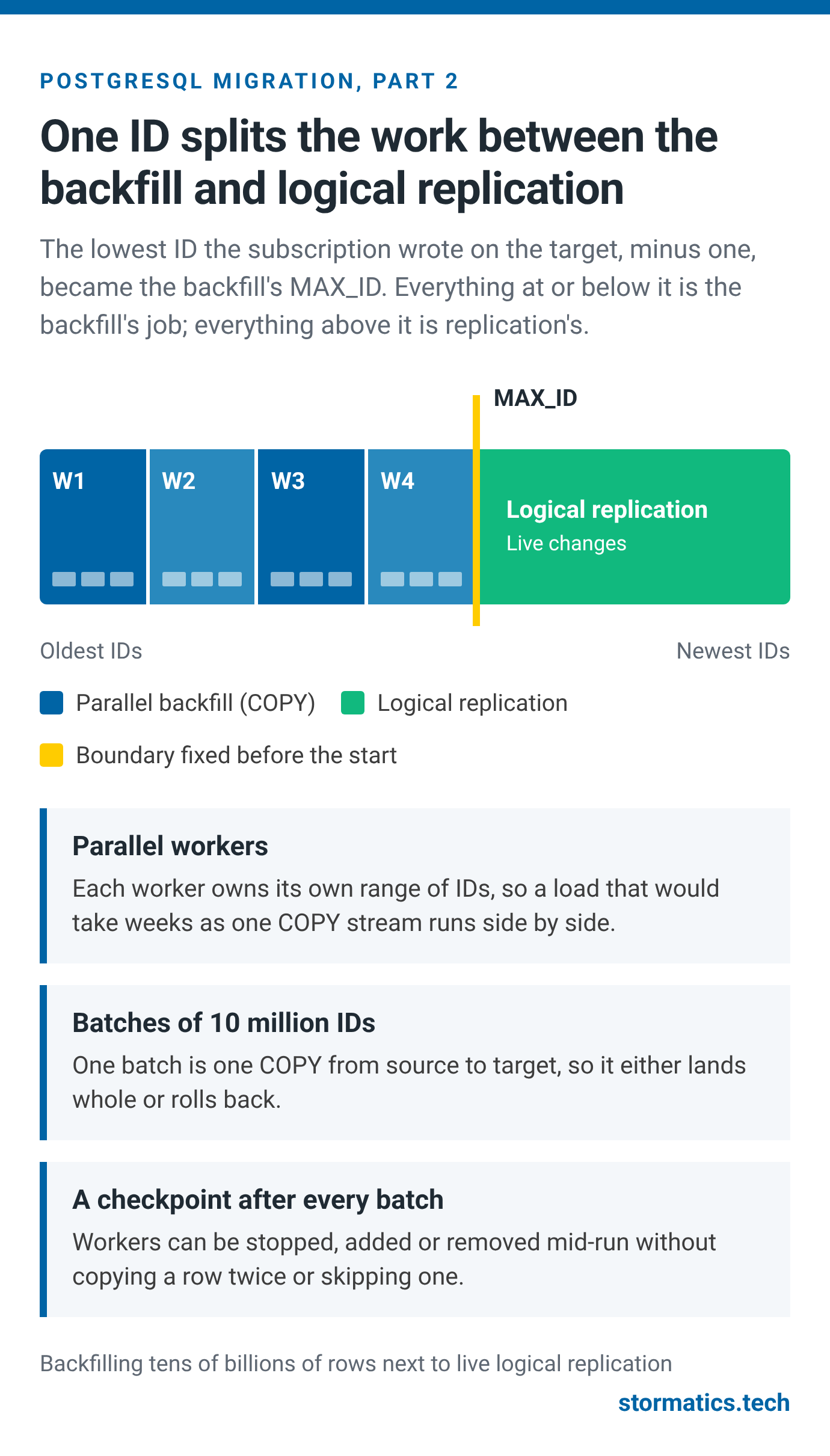
The backfill had to survive being stopped, restarted and re-sized in production, so every design choice served that. A single COPY stream would have taken weeks, so each large table was copied by several workers in parallel, each owning its own range of IDs.
The upper bound was fixed before anything started. The subscription was created with copy_data = false, and the lowest ID the subscription wrote on the target, minus one, became the backfill’s MAX_ID. Everything above that line is replication’s job; everything at or below it is the backfill’s. That one number is also the dividing line the monitor in Part 1 checks on each side.
How the script works:
- On start, it reads how far each previous segment got and works out exactly which ID ranges are still missing.
- It splits only those missing ranges evenly across the configured number of workers and saves that plan atomically.
- Each worker copies its range in batches of 10 million IDs. One batch is one
COPYfrom source to target, so a batch either lands whole or rolls back. - After each batch commits, the worker records the last ID it finished in a checkpoint file named after its own segment. No other segment can ever read it.
- On restart, a quick count on both sides catches the rare batch that committed just before its checkpoint was saved, so it is marked done instead of copied twice.
That design paid for itself several times. Changing the worker count became stop, edit, start: finished ranges are never copied again and no range is left out.
The Stuck Worker
One morning a single worker had produced no log line for seven hours while the others moved on. On the source, its session showed state = active with wait_event = ClientRead: the server was waiting on a client that had stopped reading. A network stall had silently broken the stream.
Because the batch in flight was one transaction, the fix was safe: stop the script, let that batch roll back, start again. The script re-split what was left, and the stalled range was copied again from its last checkpoint. We added TCP keepalives to the connection strings afterwards so a dead peer is noticed in minutes, not hours.
Even IDs, uneven work
The workers did not finish together. Some finished well ahead of the others. The split was even in IDs, not in actual rows. ID ranges are not uniformly dense: gaps from rolled-back inserts, deleted rows and changes in write volume over the years mean two equal ID ranges can hold very different row counts.
For a progress estimate, IDs remaining is a good enough proxy. For balancing work, splitting by row-count quantiles of the source would have kept the workers together. The re-split on restart was the practical fix: when one worker finished early, a stop and start spread the remaining ranges across all of them again.
The Indexes You Keep During a Bulk Load
Every index on a table is written again for every row a COPY inserts. For a load of billions of rows, the textbook approach is to load into a table with only the indexes the load itself needs, then build the rest afterwards in one sorted pass.
What the load needs here is small:
| Index | Keep during the load? | Why |
|---|---|---|
| Primary key | Yes | Logical replication finds rows by it for every UPDATE and DELETE it applies. |
An index leading on ID | Yes | The restart check and the exact per-batch counts are range lookups on ID. |
| Secondary and unique indexes | No | Nothing reads them during the load. Rebuild them before cutover. |
We kept all of them. By the time the cost was clear, replication was already applying live changes into the same tables, and dropping a unique index on a table receiving live writes removes a guarantee the application relies on. Rebuilding later would also have meant CREATE INDEX CONCURRENTLY on billions of rows on a production node, or a plain CREATE INDEX that blocks the apply worker for hours.
The lesson is about timing, not indexes. Decide the index set before the subscription is created. Once replication is live, the decision is mostly made for you.
Incident: WAL Grew to Tens of Terabytes on the Target
Partway through the backfill, the target’s data volume reached 95%, and almost all of it was pg_wal. The backfill’s COPY streams and the replication apply were generating WAL quickly, which is expected. What was not expected was that none of it was being removed.
Why WAL piles up
PostgreSQL only recycles a WAL segment once two things are true: a checkpoint has passed it, and, when archiving is on, the archiver has reported it safely archived. Each segment waiting for the archiver has a .ready marker in pg_wal/archive_status; a successful archive renames it to .done. On the target, pg_stat_archiver showed failed_count climbing. The archive command to the backup repository was failing, so every segment stayed .ready, and every segment stayed on disk.
The tempting fix, and why we refused it
The fastest way to free space was obvious: delete old files from pg_wal by date. We refused, even with the disk close to full. Files in pg_wal are not logs. PostgreSQL may still need them for crash recovery, standbys may still need them to catch up, and any segment not yet in the backup repository is the only copy of that history. Deleting by hand risks a node that cannot start and a backup that cannot be restored, which is far worse than a full disk.
The safe recovery
The goal was narrower: tell PostgreSQL the truth about segments that were already safely archived, so it could remove those itself.
- Ask the backup tool for the newest WAL segment it holds, and spot-check that segment by actually restoring it with
archive-get. - List the WAL segments genuinely present in the repository.
- Intersect that list with the
.readymarkers on the target. - For segments in both lists only, rename
.readyto.done. No WAL file is touched; only the marker changes. - Run
CHECKPOINT. PostgreSQL removes the now-archived segments on its own.
Disk space came back over the following checkpoints, and the standbys kept streaming throughout.
The trap: partial files that look archived
The first repository listing counted every file whose name matched a WAL segment. The spot-check in step 1 then failed for one of them: archive-get reported it missing. The repository held a partial upload with a .tmp suffix for that segment, left behind by a failed push. A name match is not proof of an archive.
We rebuilt the list excluding temporary files, and only then marked anything. Thousands of segments that looked archived were not. Had we trusted the first list, we would have discarded WAL that existed nowhere else.
One more detail slowed the check down: the target runs a vendor build of PostgreSQL whose control file layout differs from the community one, so the backup tool’s archive-get rejected it with a checksum error until it was told the PostgreSQL version explicitly.
What it does not fix
Marking files .done treats the symptom. Until the archiver itself works again, every heavy load fills pg_wal again, which is exactly what happened a second time later in the backfill. And any segment that was never archived is a gap in point-in-time recovery, so the first job once archiving is fixed is a fresh full backup.
Would your backups hold up under a load like this?
Here, a failing archive command went unnoticed until the disk was nearly full. Our PostgreSQL Health Check reviews your backup arrangements, recovery evidence and replication design, and shows you where the gaps are.
Incident: Replication Lag Filling the Source
Later in the backfill the pressure moved to the source. Two subscriptions, the ones carrying child_table and audit_table, had fallen behind, and their replication slots were holding WAL on the source primary. Free space there started dropping by the hour.
A logical slot keeps every WAL segment its subscriber has not yet confirmed. If the subscriber is slow, the source pays in disk. On a busy primary that is a production outage waiting to happen, because a full disk stops accepting writes.
Why the subscriber fell behind
By default a subscription applies a transaction only after it has committed on the source. The source decodes the whole transaction first, spilling it to disk once it outgrows logical_decoding_work_mem, then sends it, and a single apply worker replays it. With the target already busy absorbing the backfill, large transactions queued behind each other.
What we could and could not change
The constraint was firm: no restart of the production Patroni cluster, and nothing that could break the migration. That ruled out several common suggestions.
| Setting | Effect | Decision |
|---|---|---|
streaming = parallel on the subscription | Streams large transactions while they are still in progress and applies them with parallel workers. Needs a PostgreSQL 16+ publisher. | Applied. A brief reconnect, nothing lost. |
max_parallel_apply_workers_per_subscription | How many parallel apply workers each subscription may use. Reload only. | Checked; already sufficient. |
logical_decoding_work_mem on the source | More memory per transaction before decoding spills to disk. Reload only. | Proposed. Raised with care, as it is per walsender. |
max_logical_replication_workers | Total worker pool. | Not changed: needs a restart. |
max_slot_wal_keep_size | Caps WAL a slot may hold. | Not applied: when the cap is hit, the slot is invalidated and replication has to be rebuilt from scratch. |
We switched one subscription first, watched it, then the second. Retained WAL stopped growing, then fell, and both slots drained back to near zero.
The tempting option in that table is the last one: a WAL cap protects the source disk. But it does so by sacrificing the slot, which during a migration means sacrificing weeks of backfill. When the source disk is at risk, fix the speed of the consumer, not the size of the queue.
Small Things That Would Have Broken Cutover
Neither of these caused an incident. Both would have caused a quiet data problem after cutover, which is worse.
A timezone mismatch hiding in a column default
The source cluster ran in a regional, non-UTC timezone. The new cluster ran in UTC. Replicated and backfilled data were unaffected: values are copied as they are. The problem was the column defaults.
Several tables use timestamp without time zone columns with DEFAULT now(). That type stores wall-clock time with no zone attached, and now() is converted to it using the session’s TimeZone setting. So after cutover, every new row would have been stamped hours apart from every historical row in the same column, with nothing in the data to show which was which.
The fix was to set the target’s TimeZone to match the source on every node, primary and standbys alike, and reload. Two details matter:
ALTER SYSTEMwrites a local file. It is not replicated, so each node needs it. It works on a standby too.- If the cluster’s configuration is managed by automation, put the setting there as well, or the next run will quietly put UTC back.
And when checking, query TimeZone, not log_timezone. They are separate settings, and the second only affects log timestamps.
A subscription that has failed quietly
The subscription for audit_table showed as enabled, and the table sat in the initial-copy state for hours. Nothing obvious was wrong until pg_stat_subscription_stats showed sync_error_count past a hundred. The table-sync worker had been failing, retrying and failing again, and the reason was only in the target’s log: permission denied on the source. The replication role had never been granted SELECT on that one table.
One GRANT fixed it. The lesson is what to watch: an enabled subscription is not a working one. Check srsubstate in pg_subscription_rel reaches r (ready) for every table, and that the error counters in pg_stat_subscription_stats stay flat.
Revisiting the Reconciliation From Part 1
Part 1 ended with a reconciliation statement: once child_table was backfilled, replay the latest captured value from audit_table onto any row that did not match. Preparing to run it for real against tens of billions of rows, we found two flaws. Neither shows up on a small test table.
Flaw 1: it compared the wrong column
The trigger captures a row when Information or Timestamp changes. The reconciliation only applied rows where Timestamp differed. An application update that changed Information but left Timestamp alone was captured faithfully, then skipped. In a test built with both kinds of update, every Information-only change was missed. The fix is to compare both columns, exactly as the trigger does.
Flaw 2: the plan read far more than it wrote
The audit table is small next to child_table: roughly one captured row for every few hundred rows in the table it watches. The reconciliation should touch only those rows, one primary-key lookup each.
The planner does not always agree. Batching by ID range puts a range on both tables, and with a range on child_table the planner is free to choose a hash join that reads every child_table row in the range, then discards the ones with no captured update. On a local test with one captured row in seven, a batch read 140,000 rows to update 20,000. At production density that ratio becomes hundreds to one. Statistics matter too: on a freshly loaded table that has never been analysed, the planner can believe it is nearly empty, so run ANALYZE before trusting any plan.
For this statement the right plan is a nested loop: walk the audit rows in the batch, and look up each matching child_table row by primary key. Turning off hash and merge joins for the batch session forces it. Batching also moved from update_at time windows, which have no index and read the whole audit table each time, to ranges of the audit table’s own primary key.
The corrected statement
Each batch, run on the target after writes have stopped on the source and replication has fully drained:
SET enable_hashjoin = off;
SET enable_mergejoin = off;

UPDATE "child_table" td
SET "Information" = tu."Information"->'Information',
    "Timestamp"   = tu."child_table_Timestamp"
FROM "audit_table" tu
WHERE td."ID" = tu."ID"
  AND td."ID" <= :backfill_max_id
  AND tu."Information"->'Information' IS NOT NULL
  AND (td."Timestamp"   IS DISTINCT FROM tu."child_table_Timestamp"
       OR td."Information" IS DISTINCT FROM tu."Information"->'Information')
  AND tu."ID" BETWEEN :batch_start AND :batch_end;
What changed, and why:
td."ID" <= :backfill_max_id: the race from Part 1 only affects backfilled rows. Rows above the backfill boundary arrived through replication, along with their updates.- Both columns compared, matching the trigger. Rows that already match are skipped, so the statement is safe to run again.
- Batches by the audit table’s ID, so each batch reads its audit rows through the primary key.
- Hash and merge joins off for the session, so
child_tableis read only by primary-key lookups.
It runs from the same kind of script as the backfill: the audit table is cut into batches of a fixed number of rows, split across parallel workers, each batch one transaction, finished batches recorded, failed batches retried. Before the first batch, the script checks the plan and refuses to start unless it is a per-row primary-key lookup.
The broader lesson: a statement that is correct on a test table can still be wrong at scale. Look at the plan on production-sized data, with fresh statistics, before the cutover window rather than during it.
Verifying Without COUNT(*)
With the backfill done, the obvious final check is an exact COUNT(*) on both sides. At tens of billions of rows, that is hours of full scans on a production source, so we built the confidence in layers instead, each cheap and each answering a different question.
| Check | Exact? | What it proves |
|---|---|---|
reltuples and n_live_tup after ANALYZE, both sides | No, an estimate | Nothing is grossly missing: a lost segment of billions of rows shows up immediately. |
MIN("ID") and MAX("ID"), both sides | Yes, via the index | The two ends of each table match. |
| Rows copied, summed from the backfill’s own per-batch log | Yes | Every batch the script ran actually landed, with its row count. |
| Exact counts on randomly chosen ID windows, both sides | Yes, for those windows | A sample of the middle of the table matches row for row. Any difference names the exact range to re-copy. |
ANALYZE only samples a fixed number of rows per table, so it takes seconds even at this size and does not block reads or writes. Run it on the target first: after a bulk load its estimates can be badly stale.
None of these alone proves every row is present. Together, an estimate that agrees, exact ends, a complete batch log and a clean random sample make a strong case for very little cost. If certainty is required, the full chunked count can still run after cutover, from a replica of the old source, where it competes with nothing.
Planning a migration at this scale?
This migration was run by our Forward Deployed Engineers, from the first backfill batch to cutover. We handle the complexity so your business stays online while the data moves.
Closing Thought
None of the problems in this part were exotic. A stalled network stream, a failing archive command, a slow subscriber, a timezone default, a missing grant and a query plan are everyday PostgreSQL. What made them dangerous was scale and timing: each one, left alone, ended in a full disk, a broken replication slot or silently wrong data after cutover.
The pattern that worked every time was the same. Find out what the database is actually doing before changing anything, prefer the change that can be undone, and refuse the shortcut that trades a visible problem for an invisible one.
Part 3 covers the cutover itself: stopping writes, draining replication, running the reconciliation, synchronising sequences, switching traffic, and the reverse replication that keeps a rollback possible, with the numbers from the night.
Next in this series: Part 3, cutover night.
Until then, read Part 1 if you missed it, or talk to us about a migration of your own.