


Key Takeaways
- JIT compiles parts of a query into machine code at run time. It can help long-running, CPU-intensive queries, but the compilation itself takes time.
jit = ondoes not mean every query uses JIT. PostgreSQL decides based on the query’s estimated cost and thejit_above_cost,jit_inline_above_costandjit_optimize_above_costthresholds.- In the first test, a short join query took 320.230 ms with JIT and 1.972 ms without it.
- In the second test, a calculation-heavy query ran about 555 ms faster with JIT.
- Compare
SET jit = onandSET jit = offon representative queries before changing the global setting.
PostgreSQL has Just-In-Time (JIT) compilation, which can make some queries run faster. It does this by generating machine code for certain parts of the query while it is running. The main reason to use JIT is to reduce the amount of work PostgreSQL needs to do during query execution. By generating optimized machine code for parts of the query, such as expression calculations, arithmetic operations and comparisons, PostgreSQL can perform these more efficiently. However, this extra processing also comes with a cost, so the benefit depends on how much work the query actually performs.
JIT is mainly useful for long-running, CPU-intensive queries, especially those that perform heavy mathematical operations and complex calculations. Although generating this machine code takes some extra time, the query can run faster afterward. So, JIT is helpful when the time saved by faster execution is greater than the time spent compiling the code.
For simple queries, JIT may not be helpful because the extra time needed to compile the query can become overhead. The PostgreSQL documentation explains that JIT is mainly useful for long-running queries that use a lot of CPU. For simple queries, PostgreSQL may spend more time compiling the query with JIT than the time it saves by making the query faster.
That difference is easy to miss when looking at the PostgreSQL configuration. Seeing jit = on does not mean every query will necessarily use JIT, and it also does not mean JIT will improve every workload. PostgreSQL uses the estimated cost of a query and the JIT cost settings to decide when compilation should be used. The practical way to understand its effect is to test the same query with JIT enabled and disabled and compare the actual execution time.
JIT Is Controlled by More Than One Setting
PostgreSQL has several settings that control when JIT compilation is used and how much work PostgreSQL does during JIT compilation. The main settings are jit, jit_above_cost, jit_inline_above_cost, and jit_optimize_above_cost. PostgreSQL looks at the estimated cost of a query and compares it with these settings to decide whether to use JIT and how much optimization to apply.
jit_above_cost tells PostgreSQL when it should start using JIT for a query. For example, if it is set to 1000, PostgreSQL will use JIT when the estimated query cost is above 1000.
jit_inline_above_cost tells PostgreSQL when it should replace a function call with the actual code of that function to reduce extra work. For example, if a query repeatedly calls a function, PostgreSQL can place the function’s code directly into the query instead of handling a separate function call each time. If it is set to 500, PostgreSQL can use inlining when the estimated query cost is above 500.
jit_optimize_above_cost tells PostgreSQL when it should apply additional optimizations to make the generated JIT code faster. For example, if it is set to 500, PostgreSQL can apply these optimizations when the estimated query cost is above 500.
Together, these settings control not only when JIT is used, but also how much optimization PostgreSQL performs during query execution. Lower threshold values make these features more likely to be triggered, while higher values make PostgreSQL wait until the query has a higher estimated cost.
These values can be inspected directly from a PostgreSQL session:
SHOW jit;
SHOW jit_above_cost;
SHOW jit_inline_above_cost;
SHOW jit_optimize_above_cost;
The values used by these cost settings are not measured in milliseconds or seconds. They are PostgreSQL planner cost units. PostgreSQL calculates an estimated cost for a query based on the work it expects to perform, such as reading data, processing rows, and using indexes. The resulting number can be small or very large depending on the query and the amount of work involved.
For example, a simple query may have a low estimated cost while a query that scans large amounts of data, joins multiple tables, or performs complex operations can have a much higher cost. PostgreSQL compares this estimated cost with settings such as jit_above_cost to decide whether JIT should be used.
Checking these values before the test shows how JIT is configured in the PostgreSQL session.
Comparing the Same Query With JIT Enabled and Disabled
The practical test used the same PostgreSQL query with two different JIT configurations. This kept the test focused on only one change: the JIT settings. The query joins the customers, orders, order_items, and products tables. It also performs several calculations and conditions before returning the result for customer_id = 42. The SQL query itself was not changed between the two tests.
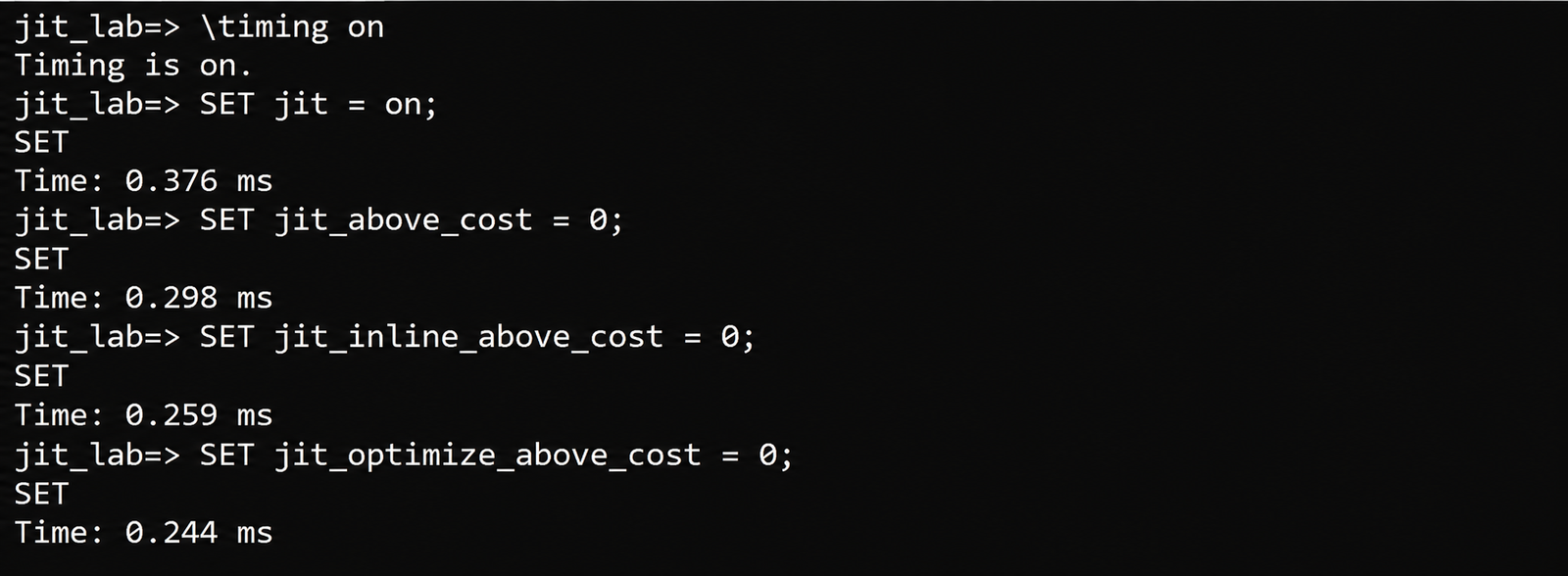
Before running the comparison, \timing on was enabled in the psql session so that the time reported by each query execution could be recorded.
For the JIT-enabled run, the session used jit = on with the three JIT cost thresholds set to 0. These were the settings used for the controlled comparison. We set the thresholds to 0 to make sure JIT and its related optimizations were triggered for the test:
jit_above_cost = 0: JIT is triggered regardless of the query’s estimated cost.jit_inline_above_cost = 0: JIT inlining is triggered regardless of the query’s estimated cost.jit_optimize_above_cost = 0: JIT optimization is triggered regardless of the query’s estimated cost.
This allowed us to test the query with JIT fully enabled and compare the result with JIT disabled.
SET jit = on;
SET jit_above_cost = 0;
SET jit_inline_above_cost = 0;
SET jit_optimize_above_cost = 0;
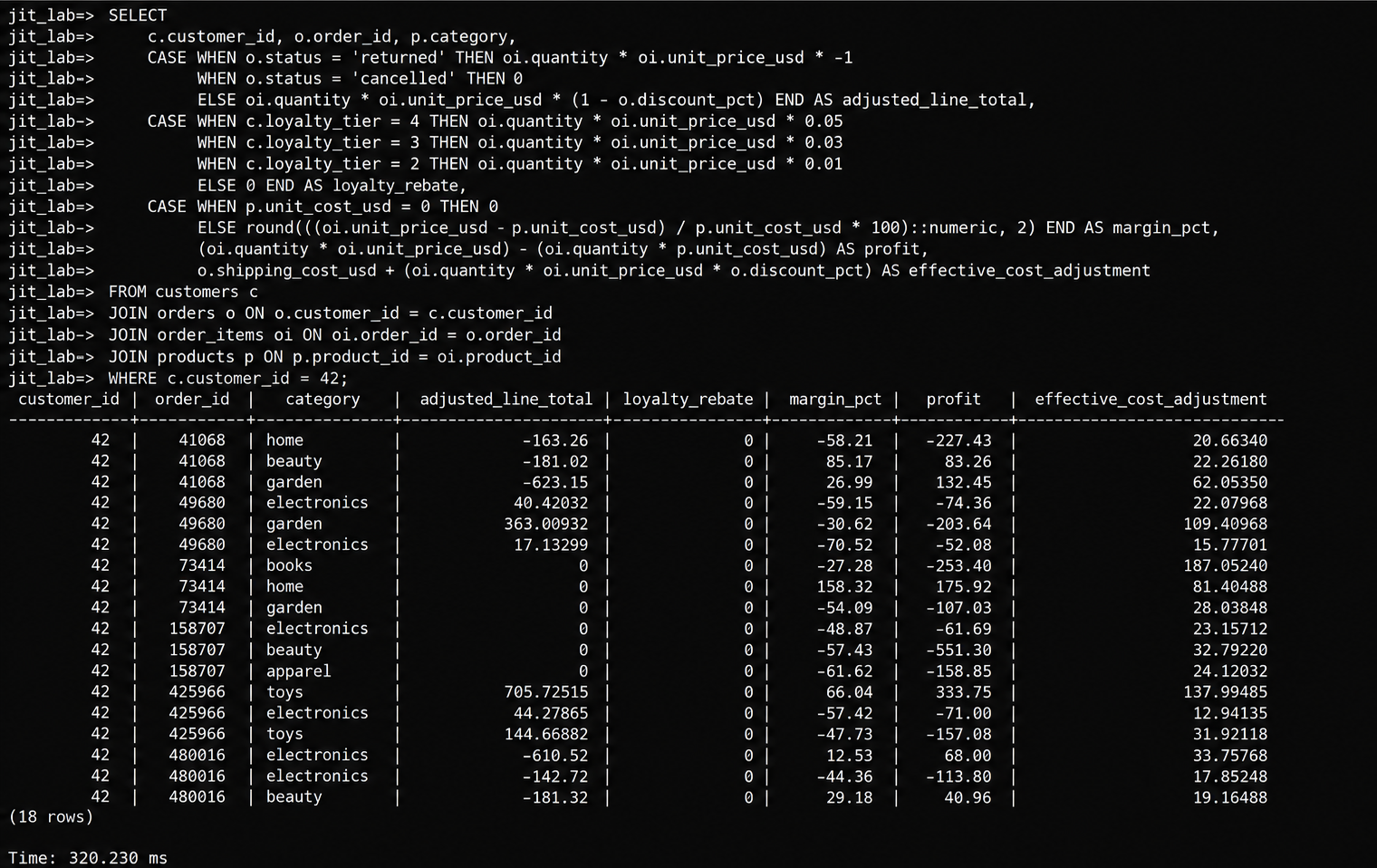
The same query was then executed again with JIT disabled. The SQL query and the rest of the test setup were kept unchanged so the two execution times could be compared directly.
SET jit = off;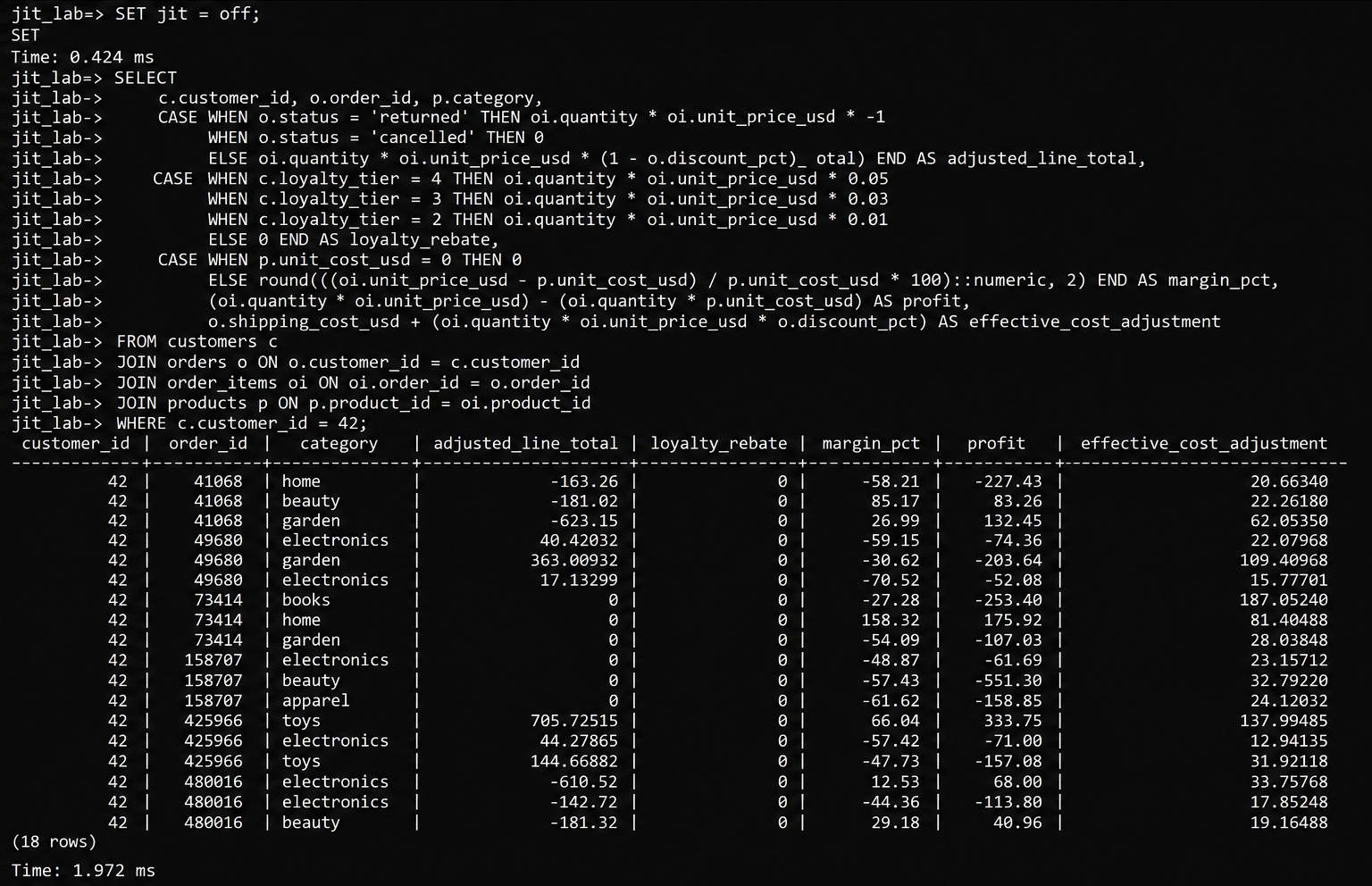
The times reported by psql were:
| Configuration | psql Reported Time |
| JIT ON | 320.230 ms |
| JIT OFF | 1.972 ms |
For this particular test, the JIT-disabled run completed much faster. The result applies to this query and test environment, so it should be treated as a measurement of this workload rather than a general rule about JIT.
A Query That Benefits From JIT
The previous test showed a case where JIT added more overhead than benefit. However, JIT can improve performance when a query performs a large amount of CPU-intensive work. To demonstrate this, a second test was run using a query that performs several mathematical calculations across the order_items table.
SET jit = on;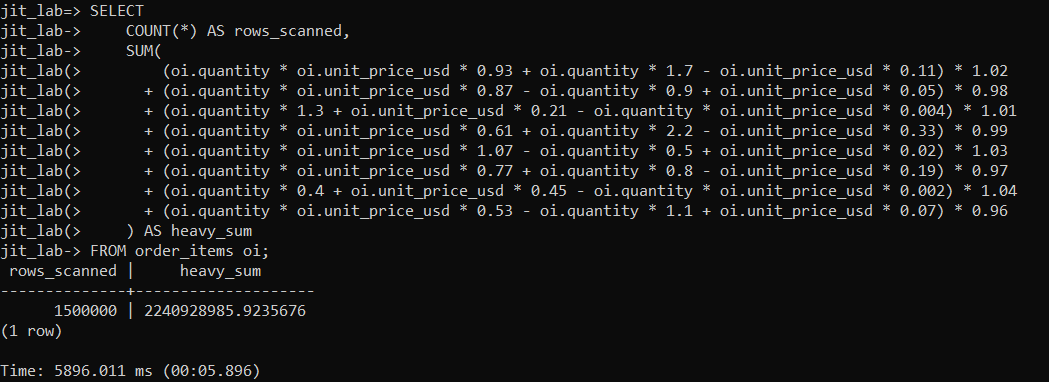
SET jit = off;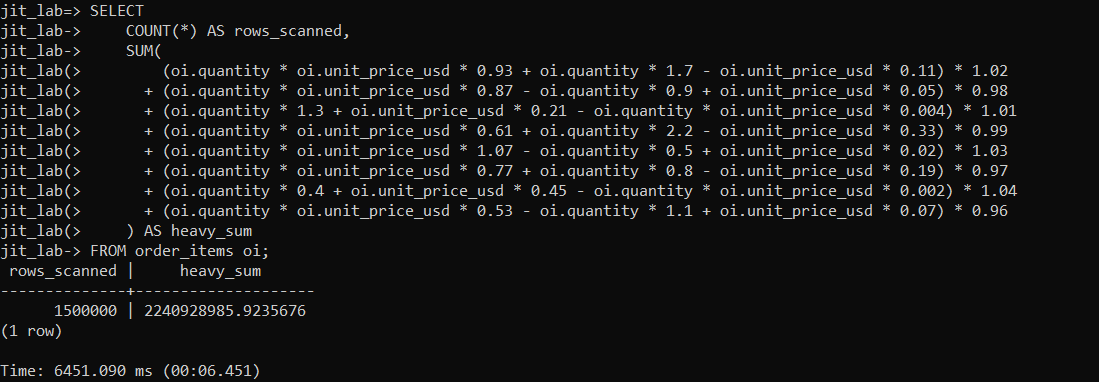
The times reported by psql were:
| Configuration | psql Reported Time |
| JIT ON | 5896.011 ms |
| JIT OFF | 6451.090 ms |
In this test, the query completed faster with JIT enabled. It took 5896.011 ms with JIT enabled compared with 6451.090 ms with JIT disabled, making the JIT-enabled run about 555 ms faster.
This result is different from the previous test. The first query was much faster without JIT because its execution time was too short to benefit from the additional compilation work. In this test, the query performs a large number of mathematical calculations, giving JIT enough CPU-intensive work to make the optimization worthwhile.
The test used a limited dataset, so the performance improvement was relatively small. With a much larger dataset and more complex CPU-intensive calculations, the difference between JIT enabled and disabled may become more noticeable because there is more work for JIT to optimize.
What the Test Actually Tells Us
The two practical tests show why JIT performance depends on the workload. In the first test, JIT increased the execution time significantly, while in the second test, JIT reduced the execution time by about 555 ms.
The difference comes from the type and amount of work performed by each query. The first query did not have enough work for the JIT optimizations to make up for the compilation overhead. The second query performed a large number of mathematical calculations, giving JIT enough CPU-intensive work to provide a performance benefit.
These results show that JIT should be evaluated based on the queries and workload being tested rather than treated as something that is always beneficial or harmful.
Don’t Change the Global Setting Based on One Test
A session-level test is useful because it lets you compare behavior without immediately changing the database-wide configuration. SET jit = on and SET jit = off affect the current session, making them suitable for controlled comparisons. PostgreSQL also makes the JIT decision based on estimated query cost, so the cost thresholds influence whether JIT is used and how much compilation work is performed.
A single query result should therefore be treated as evidence about that workload, not as a universal rule for the entire database. If a production workload contains many different query types, the same test can be repeated against representative queries before deciding whether JIT configuration needs to be changed.
Not sure which of your queries JIT is helping or slowing down? A PostgreSQL Health Check reviews your configuration and query performance and gives you a report with clear recommendations.
The Main Lesson
JIT compilation can be helpful, but it also takes extra time. PostgreSQL must first prepare and compile the code before it can make the query faster. Whether JIT is useful depends on the type of query and the overall workload. The two practical tests in this article show both cases: JIT made one query slower, while it made another query faster.
This shows why JIT should be investigated with actual measurements instead of assuming that enabling or disabling it will always improve performance.
The useful approach is simple: first identify the query and record its normal performance as a baseline. Then run the same workload with JIT enabled and disabled and compare the results. This helps you make decisions based on actual performance data instead of assumptions about PostgreSQL settings.
If planner costs, JIT or slow queries are holding back your workload, our PostgreSQL performance optimization and scaling team can help you measure the impact and tune your configuration.