


Key Takeaways
- PostgreSQL VACUUM makes the space used by dead tuples reusable inside the table, but it does not normally shrink the table file.
- After VACUUM, new rows can be placed in freed locations, as the new row in lp 11 shows.
- VACUUM FULL rewrites the table into a new file and returns unused space to the operating system, but it holds an ACCESS EXCLUSIVE lock while it runs.
- Keep autovacuum enabled. We turned it off on
bloat_demoandbloat_bigonly to keep the demo output predictable. On a real system it is what keeps dead tuples under control. - Check
n_dead_tupinpg_stat_user_tables, and usepgstattuplewhen you need exact numbers. - For tables that are updated heavily, lower
autovacuum_vacuum_scale_factoron that table so cleanup starts earlier. - Run VACUUM FULL as a maintenance-window operation. To reclaim space on a busy table without a long exclusive lock, look at an online tool such as pg_repack.
In Part 1, we saw how three UPDATE statements on one row left dead tuples in the heap of bloat_demo. In this part, we continue with the same table, so keep your psql session open and retain the bloat_demo table from Part 1.
Vacuuming the table
VACUUM is a PostgreSQL maintenance operation that cleans up row versions that are no longer needed. It makes the space occupied by dead tuples available for future reuse and also performs important transaction-management work.
So how is the space occupied by dead tuples made available again? The VACUUM command cleans up dead tuples and makes their space available for reuse:
vacuum bloat_demo;VACUUMLet’s inspect the heap after running VACUUM:
SELECT * FROM heap_page_items(get_raw_page('bloat_demo',0));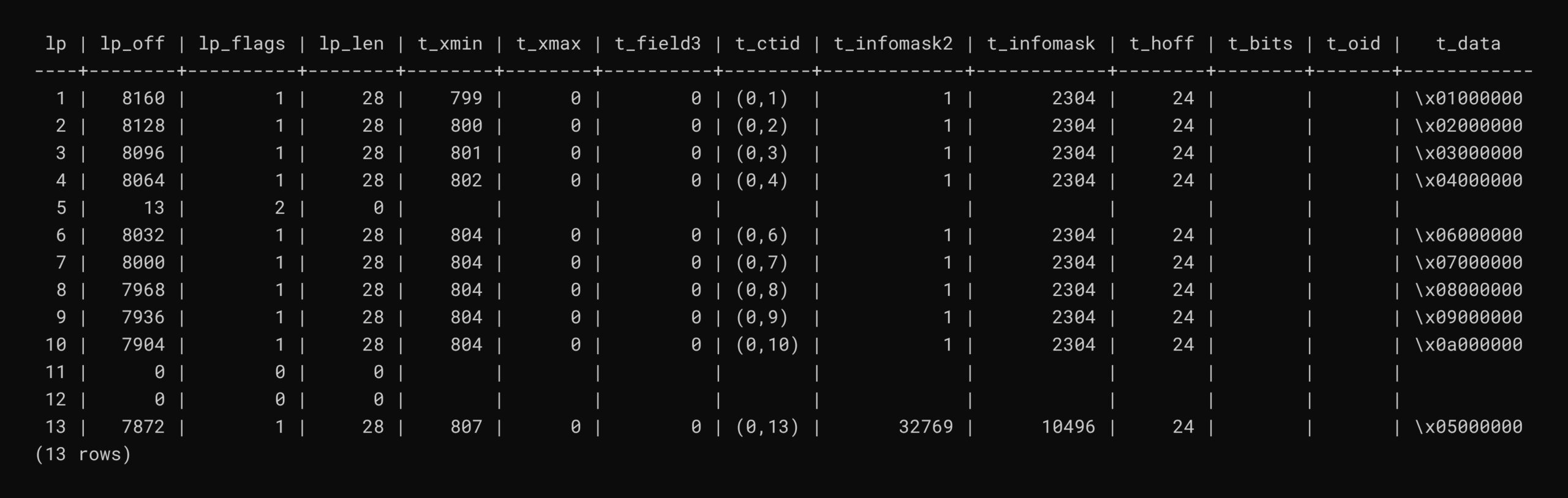
After VACUUM runs, the old tuple locations are marked as available for reuse. The space is not necessarily removed from the physical file immediately, but PostgreSQL can use that space for future tuples.
Notice that the line pointer for tuple 5 was not freed. Its lp_flags value is now 2 and lp_off holds 13, which is the target line pointer rather than a byte offset. The three updates were HOT (heap-only tuple) updates: no indexed column changed, so every new version stayed on the same page and was chained to the previous one. VACUUM removed the dead middle versions (lp 11 and 12, now lp_flags 0, unused), but kept lp 5 as a redirect so that any index entry pointing at (0,5) still finds the live tuple at (0,13).
To see this reuse in action, let’s insert another row with the value 11:
INSERT INTO bloat_demo values (11);INSERT 0 1Let’s inspect the heap once again:
SELECT * FROM heap_page_items(get_raw_page('bloat_demo',0));
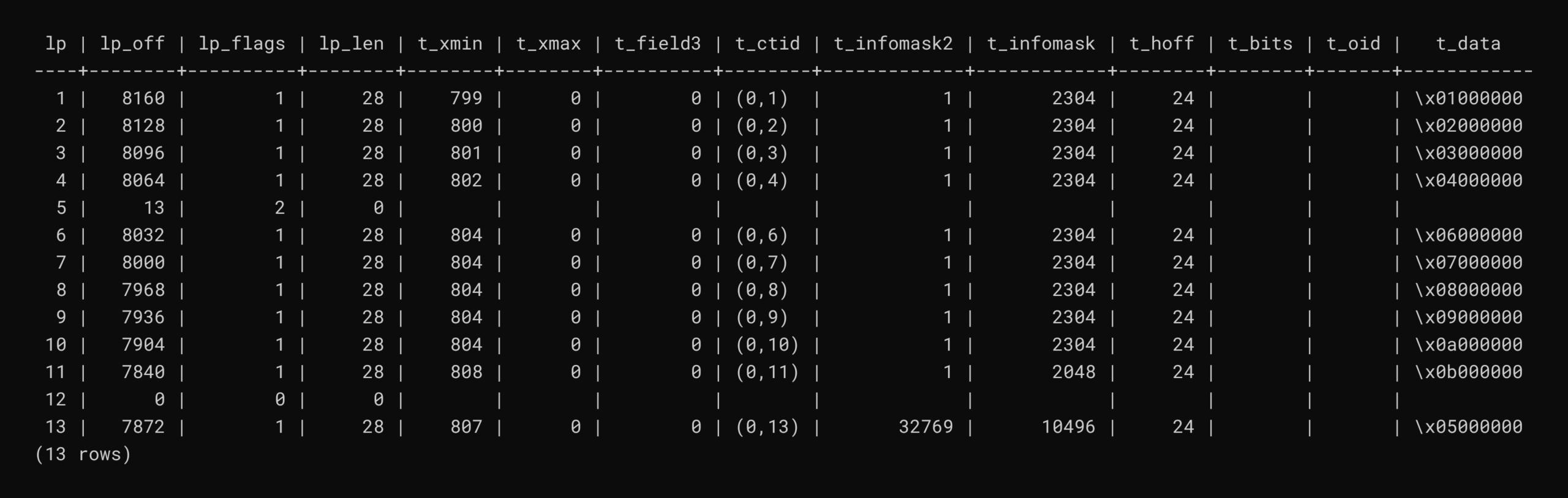
The new tuple has been placed in lp 11, a location that VACUUM had previously made available. The existing heap space is reused instead of requiring another tuple location to be added.
This is an important distinction when thinking about bloat. VACUUM normally makes space inside the existing table available for reuse, but it does not necessarily shrink the physical table file. In this example, PostgreSQL was able to reuse a location that had become free after the dead tuples were cleaned up.
This example shows the basic lifecycle behind PostgreSQL table bloat: an UPDATE creates a new row version, the previous version eventually becomes dead, and VACUUM makes that space available for reuse. Understanding this process makes it much easier to see why regular vacuuming and appropriate autovacuum settings are important for maintaining healthy PostgreSQL tables.
Measuring bloat
So far we looked at a single page. In practice, you will want to measure dead tuples and bloat across a whole table. The following query gives a quick estimate of live and dead tuples. These counters are updated asynchronously, so wait a second or two after the workload before checking:
SELECT relname, n_live_tup, n_dead_tup
FROM pg_stat_user_tables
WHERE relname = 'bloat_demo';
relname | n_live_tup | n_dead_tup
------------+------------+------------
bloat_demo | 11 | 0
(1 row)The table has 11 live tuples and no dead tuples. The earlier VACUUM already removed the dead versions, and the 11th row is the one we inserted afterwards. n_dead_tup is the counter autovacuum uses to decide when a table needs cleaning.
The pgstattuple extension reads the table itself and reports exact numbers for dead tuples and free space:
CREATE EXTENSION pgstattuple;CREATE EXTENSIONSELECT * FROM pgstattuple('bloat_demo');
pgstattuple agrees: one 8192-byte page, 11 live tuples and 0 dead tuples. The 7760 bytes of free_space is just the unused remainder of that single 8 KB page, not bloat.
On PostgreSQL 14 and later, heap_tuple_infomask_flags decodes the raw infomask values into readable flag names, which makes it easy to confirm the HOT chain we saw earlier:
SELECT lp, t_ctid, raw_flags, combined_flags
FROM heap_page_items(get_raw_page('bloat_demo',0)),
     LATERAL heap_tuple_infomask_flags(t_infomask, t_infomask2);
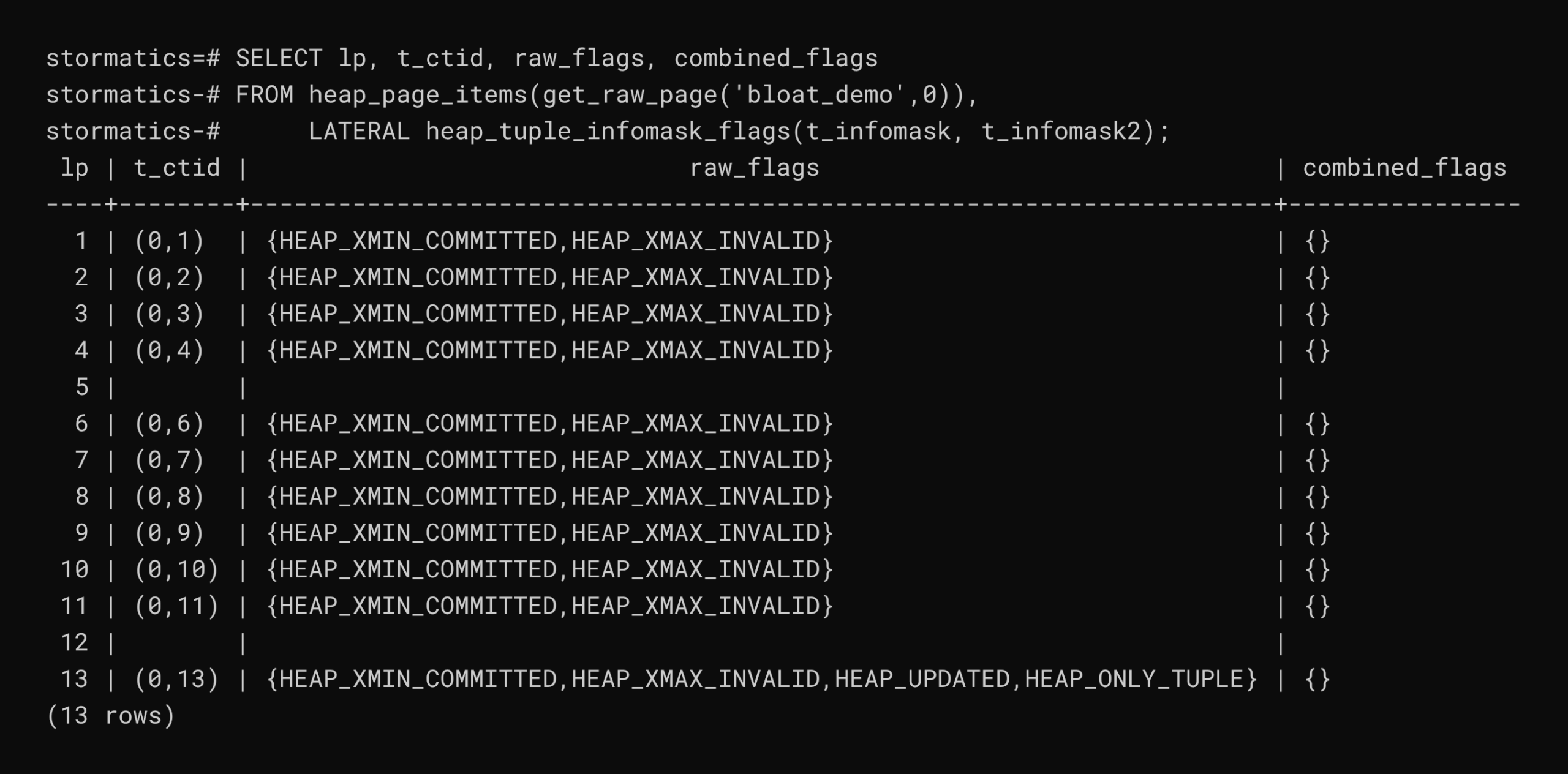
The flags decode the raw infomask numbers from earlier. lp 13 is the live end of the chain. HEAP_UPDATED shows an UPDATE created it, and HEAP_ONLY_TUPLE shows that no index entry points to it directly, which is what makes these updates HOT. lp 5 and lp 12 are empty because they no longer hold a tuple: lp 5 is a redirect and lp 12 is unused.
Want to know how much bloat your production tables are carrying? Our PostgreSQL Health Check reviews vacuuming, statistics and maintenance practices alongside performance and architecture, and gives you prioritised recommendations.
VACUUM versus VACUUM FULL
A plain VACUUM makes space reusable but does not normally shrink the table file. To see the difference, we need a table larger than one page:
CREATE TABLE bloat_big AS
SELECT g AS id, md5(g::text) AS val
FROM generate_series(1,200000) g;

ALTER TABLE bloat_big SET (autovacuum_enabled = false);

SELECT pg_size_pretty(pg_relation_size('bloat_big'));
SELECT 200000
ALTER TABLE
pg_size_pretty
----------------
14 MB
(1 row)The 200,000 rows occupy 14 MB.
Now update every row. Each row gets a new version, so the table roughly doubles in size:
UPDATE bloat_big SET val = md5(val);

SELECT pg_size_pretty(pg_relation_size('bloat_big'));
UPDATE 200000
pg_size_pretty
----------------
27 MB
(1 row)After a plain VACUUM, the dead space is reusable, but the file size stays the same:
VACUUM bloat_big;

SELECT pg_size_pretty(pg_relation_size('bloat_big'));
VACUUM
pg_size_pretty
----------------
27 MB
(1 row)VACUUM FULL rewrites the table into a new file and returns the unused space to the operating system. It takes an ACCESS EXCLUSIVE lock for the duration, so use it carefully on production tables:
VACUUM FULL bloat_big;

SELECT pg_size_pretty(pg_relation_size('bloat_big'));
VACUUM
pg_size_pretty
----------------
13 MB
(1 row)Putting the four measurements side by side:
| Step | Command | Table size | What happened |
|---|---|---|---|
| 1. Initial load | CREATE TABLE bloat_big AS ... | 14 MB | 200,000 rows, no dead tuples |
| 2. After UPDATE | UPDATE bloat_big SET val = md5(val); | 27 MB | Every row got a new version, so the table roughly doubled |
| 3. After VACUUM | VACUUM bloat_big; | 27 MB | Dead space is reusable inside the table, but the file did not shrink |
| 4. After VACUUM FULL | VACUUM FULL bloat_big; | 13 MB | Table rewritten into a new file; unused space returned to the operating system |
A plain VACUUM keeps the space inside the table for future rows, so the table stops growing, but the file stays at 27 MB. Only VACUUM FULL returned the space to the operating system, bringing the table back to about its original size.
Final thoughts
Table bloat follows directly from how MVCC works. An UPDATE or DELETE never edits a row in place; it leaves the old version in the heap until no transaction can still need it. In the small example, three updates to a single row turned 10 logical rows into 13 physical tuples. In the larger example, one UPDATE across 200,000 rows grew a table from 14 MB to 27 MB.
VACUUM turns those dead versions back into usable space. It reuses space inside the table, as the new row placed in lp 11 showed, but it does not shrink the file. That is why bloat_big stayed at 27 MB after a plain VACUUM. VACUUM FULL brought it down to 13 MB by rewriting the whole table, and it holds an ACCESS EXCLUSIVE lock while it does so, which blocks reads and writes on that table.
If bloat is already filling disks or slowing queries on your production tables, our PostgreSQL performance optimization team can tune autovacuum for your workload and plan how to reclaim space safely.
FAQ
Does VACUUM shrink a PostgreSQL table?
No. A plain VACUUM makes space reusable but does not normally shrink the table file. In the example above, bloat_big stayed at 27 MB after a plain VACUUM.
What is the difference between VACUUM and VACUUM FULL?
VACUUM makes the space occupied by dead tuples available for reuse inside the table. VACUUM FULL rewrites the table into a new file and returns the unused space to the operating system, but it holds an ACCESS EXCLUSIVE lock while it does so, which blocks reads and writes on that table.
How do I check dead tuples in a PostgreSQL table?
Check n_dead_tup in pg_stat_user_tables for a quick estimate, and use pgstattuple when you need exact numbers for dead tuples and free space.
Should I turn off autovacuum?
No. Keep autovacuum enabled. We turned it off on bloat_demo and bloat_big only to keep the demo output predictable. On a real system it is what keeps dead tuples under control.
How can I reclaim space on a busy table without a long lock?
Run VACUUM FULL as a maintenance-window operation. To reclaim space on a busy table without a long exclusive lock, look at an online tool such as pg_repack.