


A deadlock happens when two transactions are each waiting for something the other one is holding. Neither transaction can continue, so PostgreSQL detects the cycle, chooses one transaction as the victim, and rolls it back so the other can continue. The error returned to the application, ERROR: deadlock detected, confirms that a deadlock occurred, but it does not explain which operations were involved or why they were waiting on each other.
That is usually where the real investigation starts. A deadlock that happens only occasionally can be difficult to reproduce because the problem depends on two operations reaching the same rows at the same time. Instead of using a retry to simply avoid the error, the useful first step is to find out which sessions were waiting, what they were holding, and what each one was trying to do when the cycle occurred.
Key Takeaways
- A deadlock happens when two transactions each wait for something the other is holding. PostgreSQL detects the cycle, rolls one transaction back so the other can continue, and returns
ERROR: deadlock detected, which confirms the deadlock but not its cause. - A common pattern is two transactions that need some of the same rows but acquire their locks in a different order.
pg_stat_activityshows which sessions are waiting on a lock, andpg_blocking_pids()shows which sessions are blocking them. Looking while the problem is happening reveals how the transactions relate.- A retry only deals with the transaction that lost. The lock-order conflict remains, and retries add more attempts when the system is already under load.
- The fix is a consistent lock order, so transactions wait in line instead of waiting for each other. Confirm it with the
deadlockscount inpg_stat_databaseover a longer period, not one short test.
Understanding the Deadlock Problem
Deadlock errors can appear in production when multiple transactions try to update the same rows at the same time. They may occur only under certain timing conditions, which makes the problem difficult to reproduce and connect to a specific operation.
A retry would simply make the application try the failed operation again. But that would only deal with the transaction that lost the deadlock. It would not explain why the two operations were interacting in the first place, or prevent the same situation from occurring again.
So the first step was not to change the application code. It was to understand what PostgreSQL was dealing with when the deadlock occurred.
Understanding the Deadlock Conflict
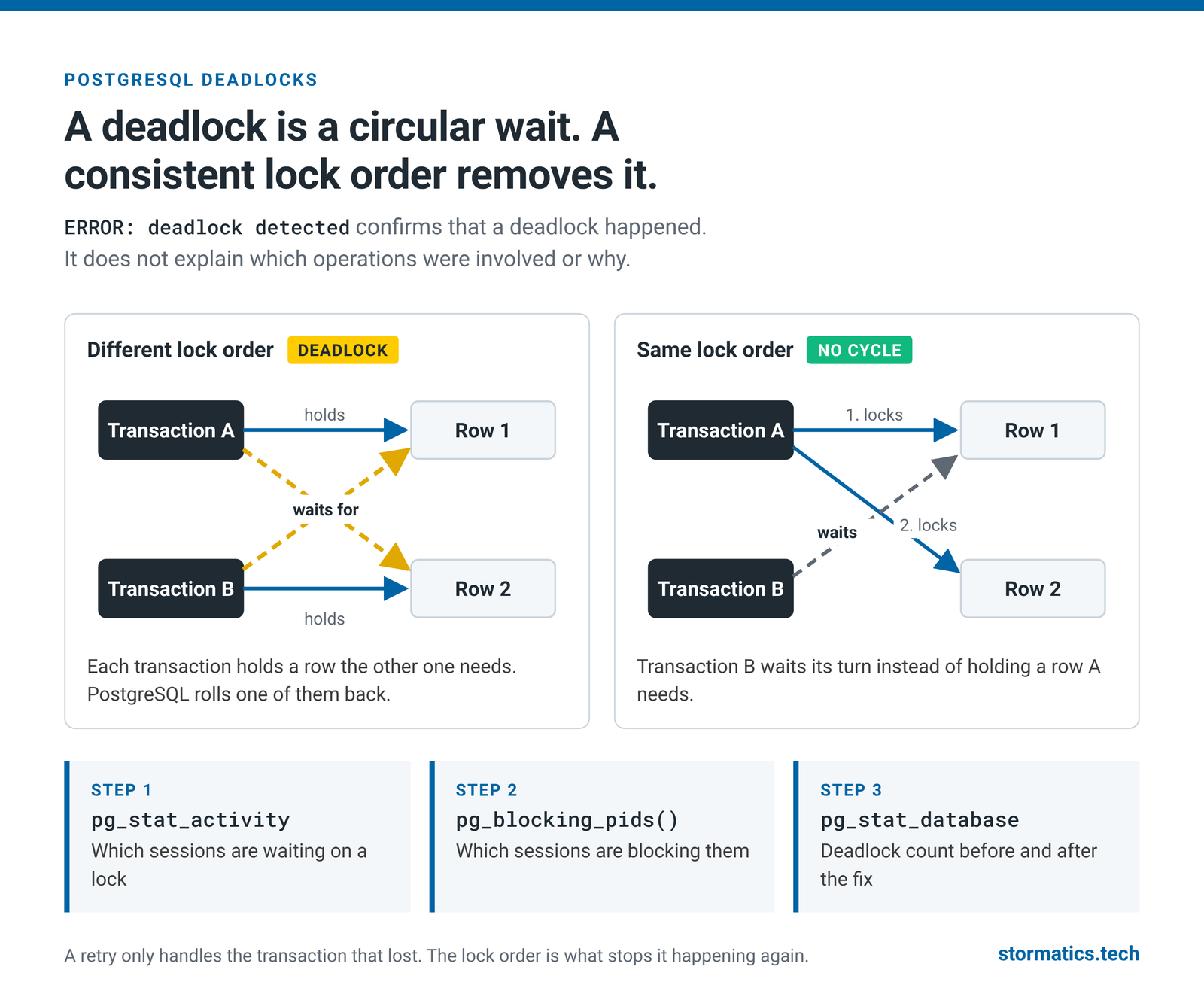
A common deadlock pattern appears when two transactions need to work with some of the same rows but acquire their locks in a different order. Each transaction can successfully lock the first row it needs, but then it has to wait for another row that is already locked by the other transaction.
For example:
Transaction A
Holds: Row 1
Waiting for: Row 2

Transaction B
Holds: Row 2
Waiting for: Row 1
Transaction A cannot continue until Transaction B releases Row 2, while Transaction B cannot continue until Transaction A releases Row 1. Both transactions are therefore waiting for each other, creating a circular wait.
This can happen in many types of applications. The actual tables and operations may be different, but the underlying pattern is the same: the transactions acquire overlapping locks in different orders.
PostgreSQL detects this circular wait and aborts one of the transactions so that the other can continue. The important part of the investigation is identifying which rows or locks created that cycle rather than only looking at the transaction that was aborted.

How To Track Down the Conflict
The first step in investigating a deadlock is to identify which sessions are waiting for locks and which other sessions are blocking them. PostgreSQL provides this information through pg_stat_activity and the pg_blocking_pids() function, making it possible to see the waiting session, the session blocking it, and the query involved.
A simple check for sessions currently waiting on locks is:
SELECT
    pid,
    usename,
    state,
    wait_event_type,
    wait_event,
    query
FROM pg_stat_activity
WHERE wait_event_type = 'Lock';
This shows sessions that are currently waiting for a lock. To see which sessions are blocking them, pg_blocking_pids() can be used:
SELECT
    pid,
    pg_blocking_pids(pid) AS blocking_pids,
    query
FROM pg_stat_activity
WHERE cardinality(pg_blocking_pids(pid)) > 0;
The first query helps identify the session that is waiting, while the second shows the process IDs of sessions currently blocking it. Looking at this information while the locking problem is occurring can help trace the relationship between the transactions instead of relying only on the application error.
The goal is not just to find a blocked session, but to understand whether the waiting forms a cycle between transactions. That relationship is what turns ordinary lock waiting into a deadlock.
Why a Retry Was Not the Fix
A retry can be useful when an application needs to recover from a transaction that PostgreSQL has rolled back. But in this case, using a retry as the primary fix would only make the error less visible.
The underlying problem was still there: the two operations could acquire locks on the same rows in different orders when they ran at the same time. If the same timing occurred again, the deadlock could happen again.
There was also a problem with relying only on retries. Deadlocks can happen when the system is busy and several jobs are running at the same time. A retry adds another attempt when the system is already under load and multiple operations are competing for the same rows.
The better approach was to remove the circular wait itself.
The Fix: Use a Consistent Lock Order
The fix was to make both operations acquire the relevant rows in the same order.
For example:
UPDATE jobs
SET status = 'failed'
WHERE id IN (
    SELECT id
    FROM jobs
    WHERE worker_id = 12
      AND status = 'running'
    ORDER BY id
    FOR UPDATE
);
The important part here is the consistent ordering of the rows before they are locked.
If two transactions need to work with the same rows, they should lock those rows in the same order. One transaction may still have to wait for the other to finish, but they will not wait for each other, so the deadlock situation is avoided.
Instead of this:
Transaction A → waits for B
Transaction B → waits for A
the transactions effectively line up behind the same lock order:
Transaction A → locks rows in order
Transaction B → waits for the rows it needs
Waiting for another transaction is normal database behavior. A deadlock is different because the waiting forms a cycle. By keeping the lock order consistent, that cycle is no longer possible for these operations.
Want a second pair of eyes on how your application locks rows?
Our PostgreSQL developer support helps teams design scalable apps and optimize queries before problems reach production.
Confirming the Fix With Real Numbers
The fix should not be considered complete simply because the deadlock stops appearing during a short test. PostgreSQL provides a database-level deadlock count that can be used to compare the number of deadlocks before and after a change.
SELECT
    datname,
    deadlocks
FROM pg_stat_database
WHERE datname = current_database();
The deadlocks value can be checked before the change and then monitored after the fix. A short test may not catch a deadlock if the problem only occurs under specific timing conditions, so monitoring the same metric over a longer period provides a better indication of whether the problem has actually been resolved.
Validating the Deadlock Fix
A first change may appear to solve the problem during testing, but that does not necessarily mean the underlying locking issue has been removed. If the same transactions can still acquire overlapping rows in different orders, the deadlock can occur again when the timing conditions line up.
Further testing should therefore look at the same locking information again and check how the transactions are acquiring their locks. If both operations are still accessing some of the same rows, they need to follow the same lock order so that one transaction does not hold a later lock while waiting for one held by the other.
This is an important part of the investigation because the lock information shows the relationship between the operations rather than simply identifying which query happened to fail. A change that makes a deadlock disappear during one test is not enough to confirm that the underlying problem has been removed.
The better test is to reproduce the relevant workload, inspect the same database information again, and verify that the circular wait can no longer occur. This gives a much stronger indication that the locking pattern responsible for the deadlock has actually been addressed.
Closing Thoughts
A PostgreSQL deadlock does not necessarily mean that the database is stuck or that a large part of the system is locked. PostgreSQL detects the circular wait, rolls back one transaction, and allows the other to continue. The more useful question is what caused those transactions to wait on each other in the first place.
For a deadlock that happens randomly in production, PostgreSQL’s lock information can help find the cause. Once we can see which sessions are waiting and which sessions are blocking them, it becomes much easier to understand the problem.
In these situations, the underlying issue was not solved by hiding the error behind retries. It was solved by making the two operations acquire overlapping rows in a consistent order, removing the circular wait that made the deadlock possible in the first place.
Frequently Asked Questions
What causes a deadlock in PostgreSQL?
A deadlock happens when two transactions are each waiting for something the other one is holding. A common pattern is two transactions that need some of the same rows but acquire their locks in a different order, so each locks the first row it needs and then waits for a row the other already holds.
What happens when PostgreSQL detects a deadlock?
PostgreSQL detects the circular wait, chooses one transaction as the victim and rolls it back so the other can continue. The application receives ERROR: deadlock detected. A deadlock does not necessarily mean the database is stuck or that a large part of the system is locked.
How do I find which sessions are involved in a deadlock?
Query pg_stat_activity for sessions where wait_event_type is 'Lock' to see which sessions are waiting, and use pg_blocking_pids() to see the process IDs of the sessions blocking them. Looking at this while the locking problem is occurring shows the relationship between the transactions, instead of relying only on the application error.
Should I just retry transactions that fail with a deadlock?
A retry can help an application recover from a transaction that PostgreSQL has rolled back, but as the primary fix it only makes the error less visible. The operations can still lock the same rows in different orders, so the deadlock can happen again, and retries add more attempts when the system is already under load.
How do I prevent deadlocks in PostgreSQL?
Make the operations acquire overlapping rows in the same order, for example by selecting the rows with ORDER BY id and FOR UPDATE before updating them. One transaction may still have to wait for the other, but they will not wait for each other, so the circular wait cannot form.
How can I confirm a deadlock fix worked?
Check the deadlocks count in pg_stat_database before the change and monitor it over a longer period afterwards, because a short test may miss a deadlock that depends on timing. Then reproduce the relevant workload and inspect the lock information again to verify that the circular wait can no longer occur.
Deadlocks showing up in production?
Our 24×7 PostgreSQL support gives you senior engineers on call, with a 15-minute response to Sev-1 incidents, on any platform.