


Key Takeaways
- Table bloat is extra space left in a table when old row versions stay in the heap after updates or deletes.
- Under MVCC, an UPDATE creates a new row version instead of overwriting the old one, so other transactions keep a consistent view.
- Once no active transaction needs an old row version, it becomes a dead tuple. Its space stays in the table until VACUUM makes it reusable.
- The logical row count can stay the same while physical tuples grow. In the demo, 10 rows became 13 tuples after three updates.
- The pageinspect extension lets you see this at the storage level.
What causes bloat?
Table bloat is the extra space that builds up inside a table when old row versions remain in the heap after updates or deletes. The rows may no longer be visible to normal queries, but their storage is not immediately returned for reuse.
To understand table bloat, we first need to look at Multi-Version Concurrency Control, commonly known as MVCC.
MVCC is PostgreSQL’s way of handling concurrent transactions by keeping different row versions when data changes. This allows readers and writers to work without blocking each other unnecessarily while each transaction sees a consistent view of the data.
MVCC allows PostgreSQL to maintain a consistent view of the database for each transaction. Even when another transaction is modifying the same data, a running transaction continues to see the row versions that are valid for its own snapshot.
Consider a table containing millions of rows. When a row is updated or deleted, PostgreSQL cannot simply overwrite the existing version because another transaction may still need to see that older version. Instead, PostgreSQL keeps the information required to determine which version is visible to each transaction. For example, imagine a query running under transaction ID 100 while another session updates the same table under transaction ID 101. The transaction running with ID 100 started earlier, so the changes made by transaction 101 are not visible to it. A newer transaction can see the updated version. Once PostgreSQL determines that an older row version is no longer needed by any active transaction, that version becomes dead. The data is no longer visible to normal queries, but the physical space occupied by the old tuple stays in the table until VACUUM cleans it up and makes it available for reuse. These accumulated dead tuples are one of the main reasons table bloat develops.
A dead tuple is an older row version that is no longer visible to any active transaction. PostgreSQL keeps its space until cleanup can make that space available for reuse.
VACUUM is PostgreSQL’s mechanism for dealing with dead tuples. At a high level, it identifies row versions that are no longer needed and makes their storage available for reuse. VACUUM also performs other important maintenance work including helping PostgreSQL prevent transaction ID wraparound.
Let’s walk through a small example to see exactly how this works.
To determine which row versions are visible to a query, PostgreSQL uses a transaction snapshot. The snapshot contains the transaction information needed to decide which changes the current transaction can see.
Starting with a Simple Example
We will create a simple table called bloat_demo and use it to observe how PostgreSQL stores row versions.
To keep this demo reproducible, we will also disable autovacuum on this table. Otherwise, autovacuum could clean up the dead tuples in the background before we get a chance to inspect them.
CREATE TABLE bloat_demo ( col1 int );
ALTER TABLE bloat_demo SET (autovacuum_enabled = false);
INSERT INTO bloat_demo VALUES (1);
INSERT INTO bloat_demo VALUES (2);
INSERT INTO bloat_demo VALUES (3);
INSERT INTO bloat_demo VALUES (4);
INSERT INTO bloat_demo VALUES (5);
BEGIN;
INSERT INTO bloat_demo SELECT generate_series(6,10);
COMMIT;
The table now contains the 10 rows we inserted. PostgreSQL also provides columns such as xmin and xmax columns that can help us understand how each row version is associated with a transaction:
SELECT xmin, xmax, * FROM bloat_demo; xmin | xmax | col1
------+------+------
799 | 0 | 1
800 | 0 | 2
801 | 0 | 3
802 | 0 | 4
803 | 0 | 5
804 | 0 | 6
804 | 0 | 7
804 | 0 | 8
804 | 0 | 9
804 | 0 | 10
(10 rows)There is an important difference in the xmin values here. Rows 1 through 5 each have a different transaction ID because every INSERT was executed separately. Rows 6 through 10 have the same transaction ID because all five rows were inserted within the same transaction between BEGIN and COMMIT.
This transaction information is important when we start looking at VACUUM and autovacuum. Before discussing cleanup, it helps to first understand how PostgreSQL tracks row versions internally.
How does table bloat happen?
PostgreSQL stores table data in a structure called the heap. The heap contains tuples or row versions, stored across pages. A standard PostgreSQL page is 8 KB in size. Each tuple has a physical location within the heap and that location is represented by its CTID.
CTID is a PostgreSQL system column that identifies the physical location of a row version within a table.
The heap is the physical storage area where PostgreSQL keeps table rows and their different versions. Because updates can create new versions instead of replacing rows in place, the heap is also where dead tuples can accumulate and contribute to bloat.
To inspect what is actually stored inside a heap page, rather than viewing only the logical table contents, we can use the pageinspect extension:
The pageinspect extension provides functions for examining PostgreSQL’s internal page structures. It is useful when you need to see what is happening at the storage level rather than only looking at the logical table data. The extension is included in the postgresql-contrib package and requires superuser privileges to install. Note that the transaction IDs you see on your own system will differ from the ones shown in this post.
CREATE EXTENSION pageinspect;Once the extension is available, we can inspect the heap page containing the rows in our example:
SELECT * FROM heap_page_items(get_raw_page('bloat_demo',0));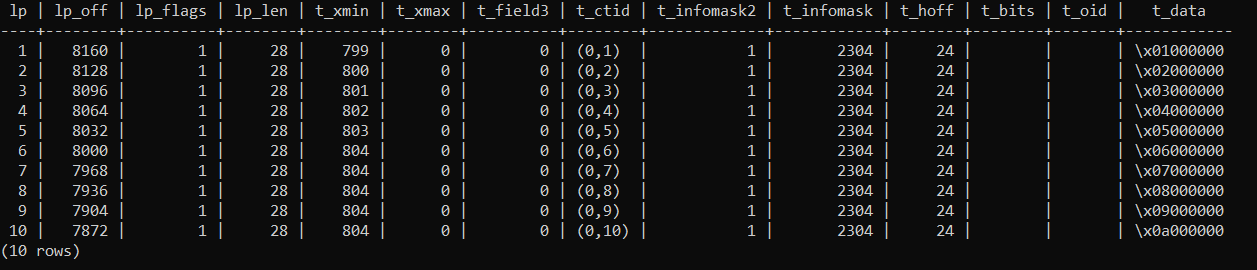
The output contains several fields that are useful for understanding the physical layout of the tuples:
lpidentifies the line pointer associated with the tuple.t_xminshows the transaction ID that created the tuple.t_ctididentifies the physical location of the tuple and can also point to a newer version created by an update.t_datacontains the actual data stored in the tuple.
At this point, every tuple points to its own location. The location is represented using the page number and tuple ID, so each row currently has a straightforward physical representation.
Now let’s update one of the rows several times. We will change the value 5 to 20, then to 30, and finally change it back to 5.
UPDATE bloat_demo SET col1 = 20 WHERE col1 = 5;
UPDATE bloat_demo SET col1 = 30 WHERE col1 = 20;
UPDATE bloat_demo SET col1 = 5 WHERE col1 = 30;
The three updates were performed in separate transactions.
Logically, nothing appears to have changed in the number of rows. We changed the value of one column three times, but we did not explicitly add or remove any rows. The table should therefore still contain 10 rows.
SELECT COUNT(*) FROM bloat_demo; count
-------
10
(1 row)The row count confirms that the table still contains 10 logical rows. But the logical row count does not tell us how many physical tuple versions are sitting in the heap. Let’s inspect the heap again.
SELECT * FROM heap_page_items(get_raw_page('bloat_demo',0));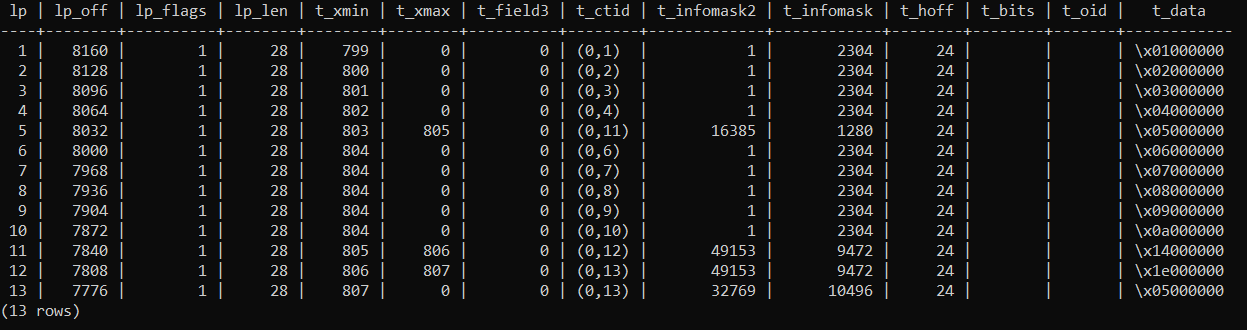
So why are there now three additional entries in the heap?
The easiest way to understand this is to examine each update transaction separately:
First update transaction:
UPDATE bloat_demo SET col1 = 20 WHERE col1 = 5;- Logically DELETE tuple ID 5
- Physically INSERT tuple ID 11
- UPDATE tuple ID 5 pointer (
t_ctid) to point to tuple ID 11
The original tuple becomes a dead row when its t_xmax is set to the transaction ID that performed the update.
Second update transaction:
UPDATE bloat_demo SET col1 = 30 WHERE col1 = 20;- Logically DELETE tuple ID 11
- Physically INSERT tuple ID 12
- UPDATE tuple ID 11 pointer (
t_ctid) to point to tuple ID 12
Once again, Tuple ID 11 becomes a dead row when its t_xmax is set to the ID of the transaction that performed the update, 806.
Third update transaction:
UPDATE bloat_demo SET col1 = 5 WHERE col1 = 30;- Logically DELETE tuple ID 12
- Physically INSERT tuple ID 13
- UPDATE tuple ID 12 pointer (
t_ctid) to point to tuple ID 13
Tuple ID 13 is live and visible to other transactions. It has no t_xmax and the t_ctid (0,13) points to itself.
The key point is that the logical row count has not changed. The table still returns 10 rows, but the heap now contains 13 tuple entries because each update created a new physical version of the row.
This is the basic reason PostgreSQL tables can develop bloat. Under MVCC, an UPDATE creates a new row version instead of simply replacing the existing tuple in place. The older version remains in the heap until PostgreSQL can determine that it is no longer needed. Those dead versions consume physical space even though they are no longer part of the current result set.
At this point the table holds 10 logical rows but 13 physical tuples, and three of them are dead. In Part 2, we will run VACUUM and see how that space is reused and measure bloat on a larger table.