
One Database at a Time, or All at Once?
You have deployed your new cluster. Now comes the work of moving your data and cutting over to it. Reading that sentence, you might assume cutover is something you figure out at the end, after the migration is done. And in practice, that is the order in which things happen. But technically, it is your cutover strategy that decides how you migrate, not the other way around.
The strategy you pick determines how you configure replication, how many slots you provision, how you handle schema changes, and what your rollback path looks like.
So before you touch replication, decide how you want to cut over.
In this post, I will walk through the two most common cutover strategies, what each one costs you, and what each one gives you back.
Approach 1: Cut Over One Database at a Time
Imagine you are moving an entire office to a new location. One way to do it is to move one team at a time, finance this week, engineering next week. Each team settles in before the next one arrives. If something goes wrong with finance’s move, it doesn’t affect engineering. You fix the problem, learn from it, and continue.
That’s exactly how this approach works with databases. You pick one database, migrate it, test it, cut it over, confirm everything is fine, and then move to the next.
Why This Approach Makes Sense
1. It’s Easier to Manage
When you are watching one database go through a cutover, you know exactly where to look if something breaks. Your team isn’t juggling ten things at once. Attention is focused, and problems surface quickly.
2. Issues Show Up Early
The first database you cut over is like a fire drill. You discover what your runbook missed, what monitoring didn’t catch, what your rollback steps actually look like in practice, all with limited impact. By the time you reach database number five, your team is smooth and confident.
3. Replication Slots Don’t Pile Up
During logical replication, the publisher (your old cluster) has to keep a replication slot open for each active subscriber. These slots hold WAL data, so the subscriber doesn’t miss anything. If you keep many databases in sync at the same time, those slots pile up, resulting in more disk usage, more memory pressure, and more risk.
When you cut over one database at a time, you drop the slot as soon as that cutover is done. The publisher breathes easier.
4. Rolling Back Is Simple
If something goes wrong after cutting over a single database, you only need to revert one database. Your reverse replication path is short and clean. You are not trying to undo a dozen cutovers at once.
5. CPU Stays Calm
Managing replication for many databases at the same time puts a real load on the publisher. WAL senders, replication workers, and the constant work of tracking changes across many slots can spike your CPU at the worst possible moment, right when you need the system to be stable. One database at a time keeps the load predictable.
6. Downtime Can Be Just Seconds
A well-prepared cutover for a single database is fast. You pause writes, confirm the subscriber has caught up (lag is zero), update your connection strings, and resume.
7. Less Room for Human Error
Cutover is a high-stress, time-sensitive operation. The fewer things your team has to do at once, the fewer mistakes happen. One database at a time means one checklist, one confirmation, one rollback plan, not ten of them running in parallel.
8. The Migration Can Be Done in Hours or a Few Days
Each database is self-contained. You don’t have to wait for every database in the cluster to be ready before you can start cutting over. Even if a database is huge, the migration window is limited to just that one.
Approach 2: Cut Over the Whole Cluster at Once
Back to the office analogy. The second approach is to load every single team onto trucks at the same time, drive them all to the new building in one convoy, and hope everything is ready for everyone. This sounds faster on paper. In practice, it’s a lot harder to pull off.
The Challenges You Will Face
1. Parameter Values Scale With Database Count
When you replicate hundreds of databases at once, your PostgreSQL configuration has to scale with it. Parameters like max_logical_replication_workers and max_worker_processes need to be set high enough to handle every database simultaneously, often in the hundreds, plus some reserve.
These are not free. Each worker process consumes memory and CPU. The higher these values are, the more background processes PostgreSQL spins up, and the more pressure you put on the system at exactly the moment you need it to be stable.
2. Downtime Grows With the Size of the Cluster
When you cut over a whole cluster, every sequence in every database needs to be fast-forwarded to a safe value on the new cluster (sequences are not replicated by logical replication). The more databases and sequences you have, the longer this takes. What might be a 30-second task for one database becomes a 20-minute task for a whole cluster.
3. One Problem Can Block Everything
If one database runs into trouble during cutover, a schema mismatch, a stuck transaction, or replication that got out of sync, the whole cutover is affected. You can’t easily move on to the others while one is stuck.
4. Schema Changes in Between Are Painful
Migrations take time. During the days or weeks that logical replication is running across many databases, developers are still making schema changes. Any change that happens on the publisher after replication is set up must be manually applied to the subscriber too, or replication breaks for that database. When you’re tracking this across many databases over a long window, things get missed. And when they get missed, someone has to fix it by hand, usually under pressure.
5. New Databases Can Appear Without Anyone Knowing
In a busy engineering environment, other teams might create new databases during your migration activities. If no one tells the database team, those databases simply don’t exist on the subscriber side. They get skipped. Nobody finds out until something that was supposed to be on the new cluster is still quietly running on the old one.
6. Rolling Back Is Slow and Painful
If you need to roll back after cutting over many databases, you have to set up reverse logical replication for all of them. That’s a big job. The longer the migration window, the more data has changed on the new cluster, and the harder it becomes.
7. The Migration Window Can Stretch Into Weeks
Because everything has to be ready before you can cut over, and because schema changes keep trickling in, the preparation phase for a whole-cluster cutover tends to grow. What started as a few days job turns into weeks of keeping everything in sync while the business keeps changing around you.
8. A Single Restart Can Set You Back to Zero
If your publisher cluster runs on Patroni and a PostgreSQL restart happens, say due to an OOM kill, Patroni will drop any replication slots it does not recognise as its own.
Logical replication slots created for your migration fall into exactly that category. Patroni sees them as unknown and cleans them up. For a whole-cluster migration, this means every database that was mid-replication loses its slot and has to start over from scratch.
You do not resume from where you left off. You recreate the subscription and let the initial data sync run again for every affected database. With hundreds of databases, that is not a setback. That is starting the entire migration over.
One way to protect against this is to tell Patroni explicitly not to drop your logical replication slots by listing them in the ignore section of your patroni.yml. I will cover this in detail in a separate post.
Side-by-Side Comparison
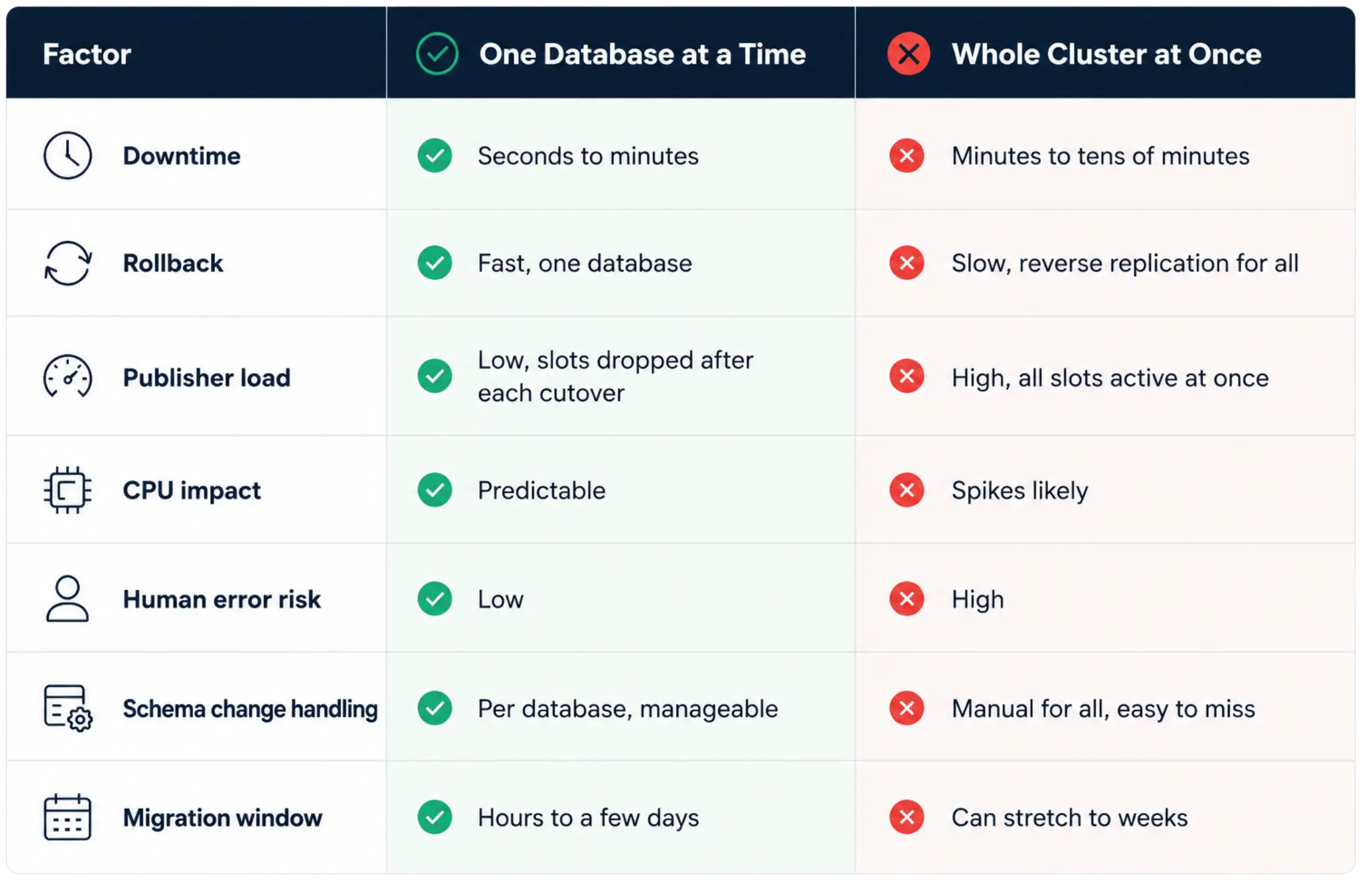
So, Which One Should You Choose?
If you have the option, cut over one database at a time. Almost every advantage lies with that approach:
- Simpler to manage and monitor
- Lower risk and faster rollback
- Shorter downtime windows
- Less load on the publisher
- Better situational awareness for the team
The whole-cluster approach has its place. Sometimes, business constraints mean you cannot have different databases on different clusters at the same time. Sometimes the application architecture makes it impossible to split the traffic. In those cases, you may not have a choice.
But if you do have a choice? Do it one database at a time. Move one team at a time. Let each database settle into its new home before you move the next. Your on-call rotation will thank you.